
Connect SillyTavern to WanAPIs
SillyTavern connects to any OpenAI-compatible API through its Custom (OpenAI-compatible) source. Point it at WanAPIs and one key gives you Claude, DeepSeek, Gemini and more for story-driven roleplay, adventures and long-form writing. Every step below was tested on SillyTavern 1.19.0. Please note: our acceptable use policy does not allow sexually explicit content, and we don't provide or support jailbreak presets.
At a glance
- Base URL
- https://api.wanapis.com/v1 (stop at /v1)
- SillyTavern settings
- API: Chat Completion; Chat Completion Source: Custom (OpenAI-compatible)
- Model list
- Fetched from /v1/models; shows the models in your key's first group only
- Streaming
- Supported
- Recommended Claude group
- claude max (tested with character cards; it stays in character)
- Billing
- Per token; see the model pages for prices. The same model can be priced differently in different groups
- Data
- The gateway does not store chat content or use it for training. Request metadata (time, model, token counts; no content) is kept for 90 days. Requests are forwarded to upstream model providers for processing
- Content policy
- No sexually explicit content; jailbreak presets are not supported or provided
Last verified: SillyTavern 1.19.0 · 2026-10-03 (connection, model list, Test Message, streamed character chat and the one-line command all tested)
Setup steps
- 1
Create a dedicated key and pick its groups
In the WanAPIs console, open API Keys → Create API Key. Claude only: set the group to claude max, the group we recommend for Claude roleplay (priced above the default group). Claude plus DeepSeek, Gemini and others: under Group priority order put claude max first, then use Add group to add default. Models that claude max has (Claude) go through claude max; everything else falls through to default. Turn Cross-group retry off so a failed Claude request never moves to another group. Setting a quota limit on the key is a good idea.
Console → API Keys → Create API KeyName: SillyTavern Group priority order: 1. claude max 2. default Cross-group retry: off Quota: optional limit - 2
Open API Connections and choose Custom (OpenAI-compatible)
Click the plug icon (API Connections) at the top of SillyTavern. Set API to Chat Completion and Chat Completion Source to Custom (OpenAI-compatible).
- 3
Enter the URL and key, then click Connect
Set Custom Endpoint (Base URL) to https://api.wanapis.com/v1. Stop at /v1 and don't add /chat/completions; SillyTavern adds it. Paste your sk- key into Custom API Key and click Connect. A green Valid below means you're connected.
SillyTavern → API ConnectionsCustom Endpoint (Base URL): https://api.wanapis.com/v1 Custom API Key: sk-xxx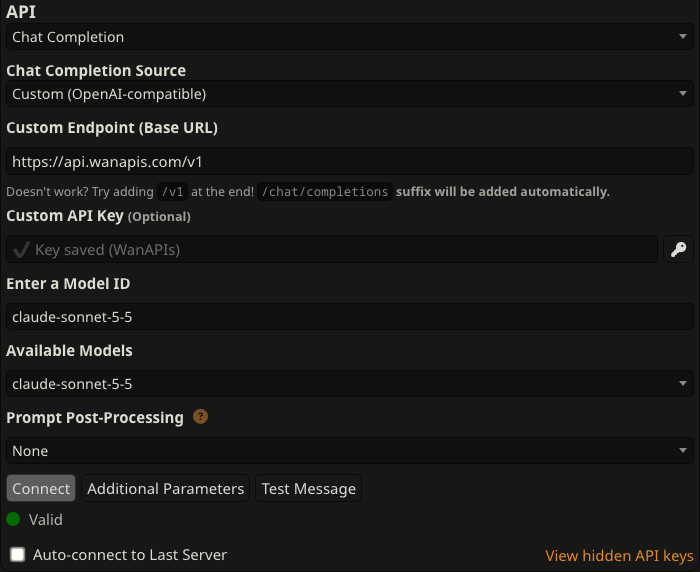
Tested on SillyTavern 1.19.0: base URL ends at /v1 and the status shows Valid - 4
Choose a model
Pick a model from Available Models; it fills in Enter a Model ID for you. The dropdown only lists models in your key's first group, so models from the default group (DeepSeek, Gemini and so on) won't appear there. Just type the model ID into Enter a Model ID. Leave Prompt Post-Processing on None.
Recommended models (type into Enter a Model ID)claude-sonnet-5-5 # claude max group, the main roleplay pick claude-opus-5-5 # claude max group, stronger and pricier deepseek-v4-flash # default group, low cost, good for long chats gemini-2.5-pro # default group - 5
Send a Test Message and save a connection profile
Click Test Message. Once you get a reply you're ready to chat. To switch back to this setup in one click later, use the Create a new connection profile icon next to Connection Profile at the top.
- 6
(Optional) Fill everything in with one command
Paste this line into the chat input and press Enter. It switches to Custom (OpenAI-compatible) and fills in the base URL and model. You still need to paste your key into Custom API Key and click Connect (step 3). If you already saved a connection profile, click the Update a connection profile icon afterwards.
SillyTavern chat input/api custom | /api-url api=custom connect=false https://api.wanapis.com/v1 | /model claude-sonnet-5-5
Known limitations
- Not tested in SillyTavern: tool calling, image input (vision) and structured output.
- Claude 4.7 and later (including claude-sonnet-5-5 and claude-opus-5-5) no longer accept custom temperature, top_p or top_k values. WanAPIs removes these parameters automatically, so those sliders have no effect on these models.
- Claude 4.6 and later don't support prefilling the reply (Start Reply With / assistant prefill), so enabling it may cause errors.
- Leave Reasoning Effort on Auto. Setting a specific level on claude-sonnet-5-5 and similar models can currently cause errors.
- The model list only shows your key's first group. Type model IDs from other groups manually.
FAQ
I get "Missing /v1 in the endpoint" (invalid_base_url).
Your base URL is missing /v1. Change it to https://api.wanapis.com/v1 and click Connect again.
I get "No available channel for model … under group …".
The model ID is wrong (wrong case or a trailing space), or your key's groups don't include that model. Copy the model ID from the model pages, and add default to your key's group priority order if you want default-group models.
It says my quota is insufficient.
Your account balance or your key's quota limit has run out. Top up under Wallet in the console, or raise the key's limit under API Keys.
Why does Available Models only list Claude?
The list only shows your key's first group (claude max). Models in the default group still work; type the model ID into Enter a Model ID.
Can I use it for NSFW content or with jailbreak presets?
No. Our acceptable use policy prohibits sexually explicit content, and we don't provide or support jailbreak presets. Story-driven roleplay, adventures, tabletop campaigns and long-form writing are all welcome.
Are my chats stored or used for training?
The gateway does not store chat content and never uses request content for training. Request metadata (time, model, token counts; no content) is kept for 90 days so you can check usage in the console. Requests are forwarded to upstream model providers for processing. See our Data & Security page for details.
How do I set up other tavern-style clients?
It depends on what the client asks for. If it wants a base URL or API root, use https://api.wanapis.com/v1. If it wants the full request URL or a "proxy URL" (JanitorAI, for example), use https://api.wanapis.com/v1/chat/completions. Browser-based clients call the API straight from your browser, and WanAPIs allows cross-origin (CORS) requests.
Who do I contact about billing, quota or model availability?
Email [email protected], or use the support chat in the console.
Connect SillyTavern to WanAPIs now
One API key for GPT, Claude, Gemini, DeepSeek, Kimi, GLM and more — pay only for the tokens you use.