
Connect DeepSeek Harness to WanAPIs
DeepSeek Harness (dsh on the command line) is DeepSeek's open-source coding agent, and it can connect to any OpenAI-compatible API. Connecting WanAPIs takes three things: add WanAPIs as a model provider in the UI; declare the reasoning levels in the config file so the model picker offers Off / Low / High / Max; and route web search through WanAPIs too, or it fails with no API key for "DEEPSEEK_API_KEY". Every step below was tested on the web version of Harness 0.2.0-rc.2, and the screenshots come from that test.
At a glance
- Base URL
- https://api.wanapis.com/v1 (stop at /v1)
- API protocol
- OpenAI Chat Completions (openai-completions in the config file)
- Chat model
- deepseek-v4.1-flash, with Context window set to 1000000
- Reasoning effort
- Off / Low / High / Max — must be declared in the config file
- Web search model
- deepseek-v4.1-flash-1017 (the only one that works; set in the config file)
- Config file
- Settings → Open configuration file (top right); the web version uses ~/.dsh/profiles/web/cordis.patch.yml
- Cost
- deepseek-v4.1-flash: $0.50 input / $4.00 output per 1M tokens, cached input billed at 8%; web search about $0.10 per search (same units as our pricing page)
Last verified: DeepSeek Harness 0.2.0-rc.2 (web version) · 2026-10-19 (adding the provider, switching reasoning effort and web search all tested)
Setup steps
- 1
Create an API key
Create an account in the WanAPIs console and generate an API key starting with sk- on the API Keys page, in the default group. We recommend a dedicated key for Harness — the console breaks down logs and usage per key, so you can see at a glance what the agent costs.
- 2
Add WanAPIs as a model provider
In Harness, open Settings → Models → Add model provider, switch to "Custom model API" and fill it in as below. Use the lowercase Provider ID wanapis: it's effectively permanent, and the credential name WANAPIS_API_KEY used later in the config file is derived from it. Stop the Base URL at /v1 — don't add /chat/completions, Harness appends it itself.
Settings → Models → Add model provider → Custom model APIProvider ID: wanapis Display name: WanAPIs Base URL: https://api.wanapis.com/v1 API protocol: OpenAI Chat Completions API key: sk-xxx - 3
Fetch models: "Deselect all" first, then tick deepseek-v4.1-flash
Click "Fetch available models". The dialog lists every model your key can use — 200+ of them, all ticked by default. Click "Deselect all", type deepseek in the search box, tick only deepseek-v4.1-flash and click "Add selected". Tick any other models you want (such as gpt-5.6-sol or claude-opus-5) here too. The list is filtered by your key's group, so if the key isn't in the default group you may not see deepseek-v4.1-flash — click "Add model" and type the model ID by hand; it works the same.
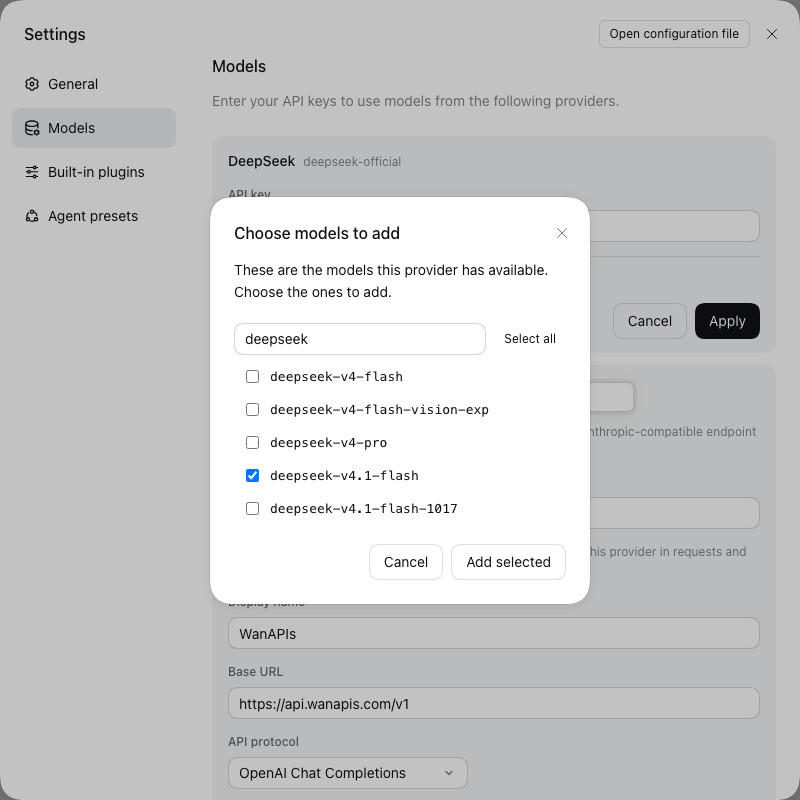
Deselect all, search for deepseek, and tick only the models you need - 4
Set the context window to 1000000 and create the provider
Click the "›" at the end of the model row to expand its options and set Context window to 1000000. Without it, Harness assumes a 262K context and cuts long sessions short with an output-limit warning. Leave Max output tokens empty. Then click "Create provider".
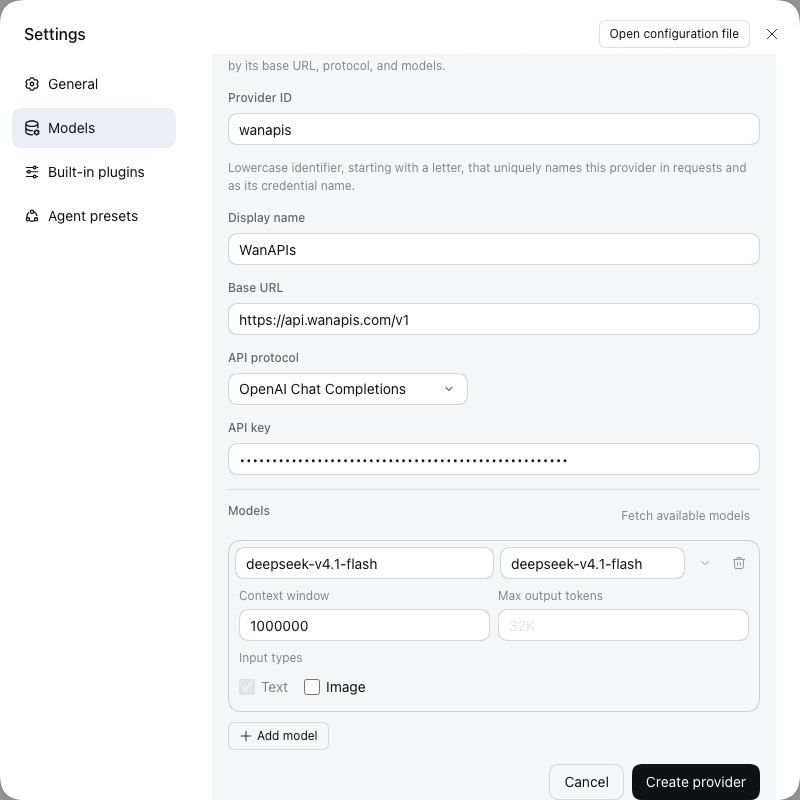
The completed form. The API key shows as dots; Context window is 1000000 - 5
Enable reasoning effort: declare the levels in the config file
Harness can't detect DeepSeek's reasoning levels from the API, and the UI has no setting for them. Until you declare them, the model picker shows only Model and no Effort menu. Open Settings → Open configuration file (top right; the web version's file is ~/.dsh/profiles/web/cordis.patch.yml), find the llm-pi-ai block written by the previous step, add a reasoning line under wanapis and compat plus reasoningEfforts under deepseek-v4.1-flash — the lines marked "new" below. Indent with spaces, and consider copying the file first as a backup.
~/.dsh/profiles/web/cordis.patch.yml- id: llm-pi-ai name: "@deepseek-ai/dsh-llm-pi-ai" config: providers: wanapis: reasoning: high # new: default level for new sessions displayName: WanAPIs apiKeyEnv: WANAPIS_API_KEY api: openai-completions baseURL: https://api.wanapis.com/v1 models: - id: deepseek-v4.1-flash name: deepseek-v4.1-flash contextWindow: 1000000 compat: # new thinkingFormat: deepseek # new: without it, Off still thinks reasoningEfforts: # new off: # new low: low # new high: high # new max: max # new - 6
Switch reasoning effort in the model picker
Harness reloads the config when you save — in our test no restart was needed; restart once if nothing changes. The model picker at the bottom right of the input box now has an Effort menu with Off / Low / High / Max. Off skips thinking entirely and is the fastest and cheapest; High suits everyday coding; Max is for hard problems. DeepSeek only has three levels — low, high and max — and values like medium behave like high, so these four options cover everything.
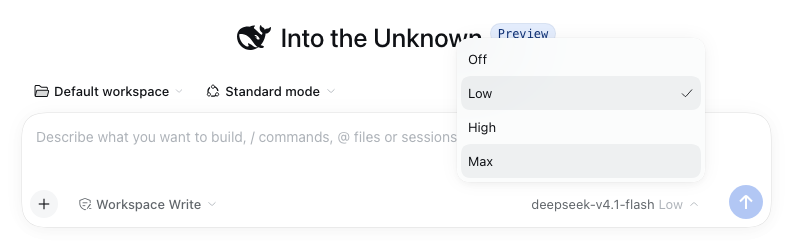
Once declared, Effort offers Off / Low / High / Max - 7
Route web search through WanAPIs
Harness's web search plugin doesn't use the chat model. It calls DeepSeek's official API on its own and looks for DEEPSEEK_API_KEY, so with only WanAPIs configured, every search fails with no API key for "DEEPSEEK_API_KEY". Add the block below to the end of the same config file. apiKeyEnv: WANAPIS_API_KEY reuses the key saved in step 2, so there's nothing to paste again; if your Provider ID isn't wanapis, copy the apiKeyEnv value from the llm-pi-ai block. model must be deepseek-v4.1-flash-1017 — with any other model name, the search isn't actually executed on our side.
~/.dsh/profiles/web/cordis.patch.yml (append at the end)- id: web-search-deepseek config: baseURL: https://api.wanapis.com/v1 apiKeyEnv: WANAPIS_API_KEY model: deepseek-v4.1-flash-1017 - 8
Check it under Plugins → Web search
Open Plugins → Web search in the left sidebar. If Endpoint shows https://api.wanapis.com/v1 (marked Overridden) and API key says "A key is configured", it worked. This page only has API key, Endpoint and Max searches per request — there's no Model field, which is why the model has to go in the config file.
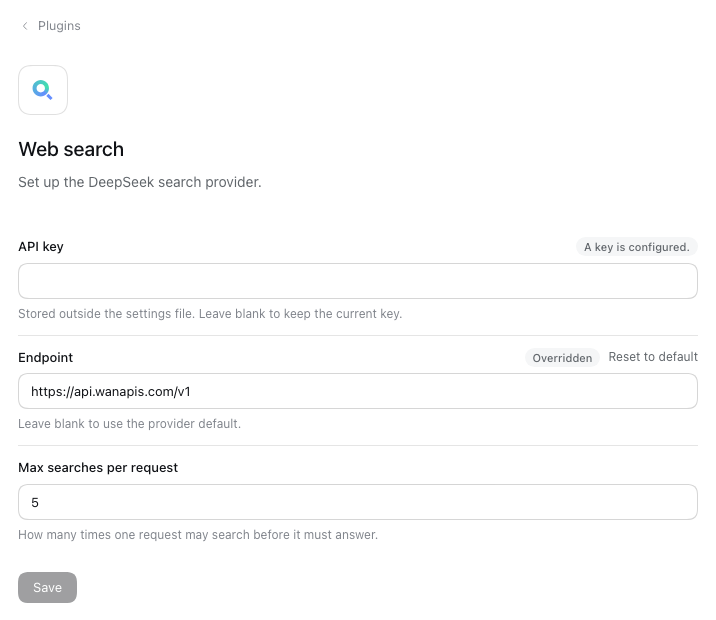
After editing the config file, Endpoint points at WanAPIs and a key is configured - 9
Try a web search and watch the cost
Start a new session and ask something that needs fresh information. If the answer comes with source links, the search really ran. Each search costs about $0.10 (a search fee of about $0.091 plus tokens). Note that the agent may search several times for one open-ended question: in our test, a broad question triggered 7 searches, about $0.70. To keep costs down, say "search just once" in your prompt. In the console logs, each search is a separate deepseek-v4.1-flash-1017 entry.
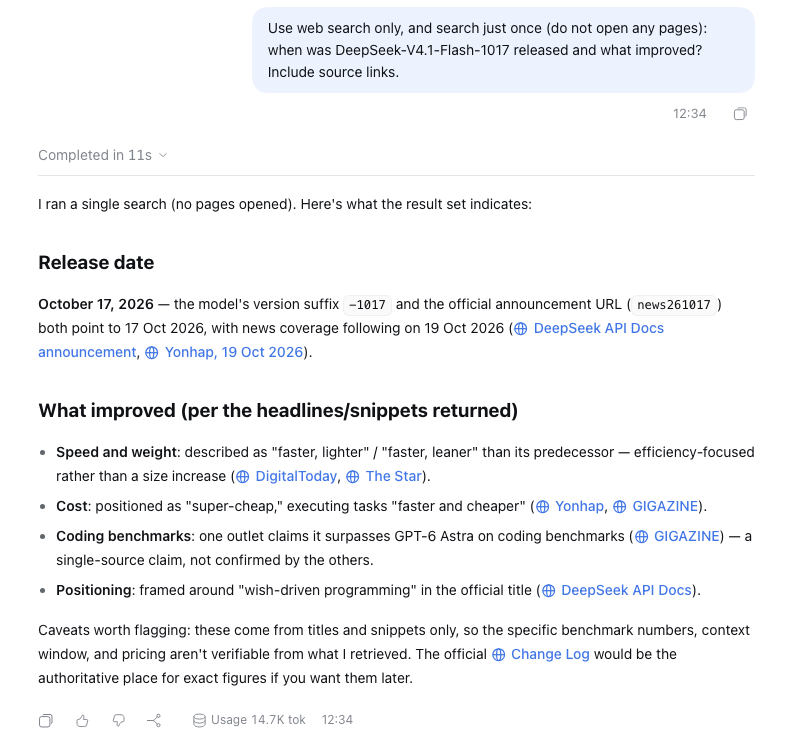
Tested: limited to one search, answered with sources in 11 seconds - 10
Cost: caching makes long sessions cheap
In the default group, deepseek-v4.1-flash is $0.50 input / $4.00 output per 1M tokens (the same units as our pricing page). Coding agents resend the same context over and over, and cached input is billed at 8%, so you mostly pay for the new part — output is where the real cost is. Give it a small task first and check the Usage Logs page in the console: the request reached WanAPIs, the model name is right and the charge looks normal.
Default group prices ($ per 1M tokens)deepseek-v4.1-flash input 0.50 output 4.00 cached input billed at 8% gpt-5.6-sol input 5.00 output 30.00 claude-opus-5 input 5.00 output 25.00
Known limitations
- Tested on the web version of Harness 0.2.0-rc.2 (dsh web). The desktop app wasn't tested; menu labels may differ slightly, but the config file format is the same.
- Reasoning levels and the web search model can only be set in the config file; the UI has no setting for them.
- Web search only works with deepseek-v4.1-flash-1017; other model names don't actually run the search on our side.
- Web fetch (opening a page's full text) runs directly from your computer — it doesn't go through WanAPIs and isn't billed.
- Harness is still in preview (0.2) and its config format may change; if something doesn't match, go by your current Harness version.
FAQ
Web search fails with no API key for "DEEPSEEK_API_KEY" — what do I do?
Harness's web search plugin is looking for an official DeepSeek key. It's configured separately from the chat model and talks to DeepSeek directly by default. Follow step 7: append the web-search-deepseek block to the config file with baseURL https://api.wanapis.com/v1, apiKeyEnv WANAPIS_API_KEY and model deepseek-v4.1-flash-1017.
No error, but the answer says nothing was found?
Most likely model wasn't changed and is still the default deepseek-v4-flash. Web search must use deepseek-v4.1-flash-1017; other model names don't actually run the search on our side. Afterwards, check that Plugins → Web search shows https://api.wanapis.com/v1 as the Endpoint.
How is web search billed? Why did one question cost so much?
Each search costs about $0.10 (a search fee of about $0.091 plus tokens). The agent decides how many times to search, and a broad question can trigger several — 7 in our test, about $0.70. Saying "search just once" in the prompt is the most direct fix. The Max searches per request setting limits searches inside one search request; it doesn't cap how many search requests the agent sends.
No Effort menu in the model picker, or Off still thinks?
No Effort menu means reasoningEfforts is missing from the config file; Off still thinking means compat: thinkingFormat: deepseek is missing — without it, Off just omits the parameter and DeepSeek thinks by default. Add the lines marked "new" in step 5; it usually applies on save, otherwise restart Harness once.
Why only Off / Low / High / Max?
DeepSeek only has three reasoning levels — low, high and max — and values like medium or xhigh behave like high, so adding Off covers everything. In reasoningEfforts, the key on the left is the label shown in the menu and the value on the right is what's sent to DeepSeek; reasoning: high under the provider sets the default for new sessions.
Long sessions say the output limit was reached and the answer was cut off?
The context window isn't set. When Harness doesn't know a model's context size it assumes 262K, so as the input grows it squeezes the output limit down — sometimes to a single token. deepseek-v4.1-flash has a 1M context: edit WanAPIs under Settings → Models and set Context window to 1000000 in the model options, or add contextWindow: 1000000 to the model entry in the config file.
It says the API key is invalid, but the key is right?
Check the key on the API Keys page in the console first. When a key has run out of quota, expired or been disabled, the gateway returns the same "invalid token" error, which Harness shows as an invalid API key. If the key looks fine, check that it was copied in full with no trailing space.
Web fetch fails with resolves to a non-public IP address?
That's a Harness safety check: web fetch opens pages directly from your computer and refuses hostnames that resolve to private or reserved addresses. A common cause is a local proxy app in fake-IP mode, which resolves domains to addresses like 198.18.x.x. It has nothing to do with WanAPIs; turning that mode off, exempting the domain, or sticking to web search avoids it.
Where is the config file, and what if I break it?
Open configuration file at the top right of the Settings window opens it directly; for the web version the path is ~/.dsh/profiles/web/cordis.patch.yml, and the desktop app usually keeps it under the desktop folder in profiles. Copy it before editing; if something breaks, delete the lines you added or restore the backup. The most common mistake is indentation — YAML only accepts spaces, aligned with the surrounding lines.
Should the Base URL include /chat/completions?
No. Harness appends the path itself, so stop at https://api.wanapis.com/v1. Entering the full path produces a duplicated /chat/completions and the request fails. Note this is the opposite of what WorkBuddy wants — don't copy configs between them blindly.
"Fetch available models" doesn't show deepseek-v4.1-flash?
The list is fully ticked and has 200+ models — click Deselect all first, then search for deepseek. If it's still missing, your key probably isn't in the default group: WanAPIs filters the model list by the key's group. Click Add model and type the model ID by hand; it works the same. For a fuller list, use a key in the default group.
Can I change the Provider ID later?
Practically no. Requests, saved sessions and credential references all point to it, and the credential name WANAPIS_API_KEY in the config is derived from it. Just use wanapis; if you must change it, delete the provider, add it again, and update apiKeyEnv in the config file.
Which of the three API protocols should I pick?
Choose OpenAI Chat Completions (openai-completions in the config file); it's the most compatible and the one this guide was tested with. WanAPIs supports all three: OpenAI Responses maps to /v1/responses and Anthropic Messages to /v1/messages. The protocol must match the URL — a mismatch usually shows up as a 404 or ignored parameters.
Where is the API key stored? Could it leak with the config file?
No. A key entered in the UI is stored in ~/.dsh/.credentials.yaml; cordis.patch.yml only holds the reference name apiKeyEnv: WANAPIS_API_KEY, not the key itself. So the config file is safe to share, but never share .credentials.yaml or commit it to a repo.
It's configured but requests fail — how do I debug?
Check the Usage Logs page in the WanAPIs console first. If the request is there, it reached the gateway — read the error reason. If there's no record at all, the request never left the client: check whether the Base URL has an extra /chat/completions, whether the key was copied in full (a trailing space is a classic), and whether the model ID exactly matches the marketplace.
Can I mix models from different vendors in Harness?
Yes — that's the point of using a gateway. Tick deepseek-v4.1-flash, gpt-5.6-sol, claude-opus-5 and others in Fetch available models, and you can switch between them under one key. Note the reasoning lines are per model, so they only apply to models you add reasoningEfforts to.
Do I need separate accounts with DeepSeek, OpenAI and Anthropic?
No. One WanAPIs key covers every model on the platform, billed per token from a single balance.
Which models are supported?
Mainstream text models — GPT, Claude, Gemini, DeepSeek, Kimi, Qwen, GLM, Grok and more. See the model marketplace for the full list. Harness is a coding agent, so choose a model that supports tool calling.
Connect DeepSeek Harness to WanAPIs now
One API key for GPT, Claude, Gemini, DeepSeek, Kimi, GLM and more — pay only for the tokens you use.